Protect your Bookmarks in GoogleChrome

Sunday
We bookmark our Favorite website in browser. are you sure whether they are safe?!
let me tell you if you share browser it becomes lit bit piracy so in that time we want to secure our bookmarks.
there is extension for Google Chrome known as LockMyFavs and now will tell you ow to use it.
with this you can add and modify the bookmarks easily!


Follow the steps:
1.U need to install LockMyFavs to Google Chrome.Download it HERE


2.It will be available in right side top next to settings button! it looks like RED STAR. click it!


3.Create an New account and sign


4.and now it is accessible so u can protect your bookmark!


5.to add bookmark click on Add fav and post link in first column and alias in second column!

6.It will be stored in Library!

7.Right click options you can see the Add to LockMyFavs option
  
NjY!
Read more ...

New Alternative to Torrent clients

Sunday
Most of the people are using torrent client to download large files and famous torrrent client are Utorrent,Bittorrent,Bitcomet,Bittornado,G3Torrent,Ziptorrent etc.
Few people think is there any alternative for this? Yes, a new torrent client known as qBittorrent.
   
Features of qBittorrent:
  • Polished uTorrent like UI
  • Well integrated search engine
  • All Bittorrent extensions like DHT,PeerExchange,Full encryption, Magnet/Bitcomet URI's
  • Remote Control via Web UI
  • Torrent creation tool
  • IPv6 compliant
Official Site: HERE
 
Download
Read more ...

Add Programs to Windows 7 Context Menu

Saturday

Windows 7 has feature named Context Menu!
In that menu is used to start frequently used apps. 
Programs linked to this menu are known as right click menu it can be edited in Windows Registry.
A freeware tool named YourMenu and it used to add programs to context menu.
This is my defaults context menu


Now follow the steps:
1.Now u want this tool
          YourMenu version1.0 with Installer HERE
          YourMenu version1.0 Portable HERE
2.Now install and run it


3.In the right bottom click on Proceed
4.Now you will be taken to Context menu option page i.e choose any one if you want single menu means select Single otherwise you want more menu means select Cascading. 

(I selected Cascading)

5.After selecting Cascading you ave to Name your Menu then on the executable file name give your file name and in the select program give your file path. I named my menu as Games and respective path is given.

6.Now click on Generate REG file and one dialog box opens Select the Location where you want to store the your menu name.reg file and then an box opens click Ok.I stored as Games.reg

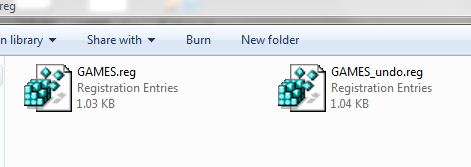
7.Double click the your menu name.reg and proceed with OK and thus you have successfully added your menu to COntext Menu. I stored GAMES.reg and GAMES_undo.reg.

8.To remove it click on you menu name_undo.reg


9. Now you right click you can see your menu in Context Menu
     
NJY!!


Read more ...

BS Player Pro with Keygen

Friday
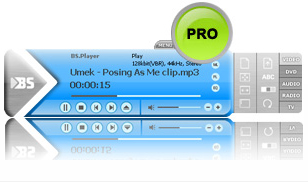
BS.Player ™ is used by more than 70 million multi media users throughout the world and it has been translated into more than 90 languages worldwide. All downloaded versions of our FREE version exceed the sum of all downloads of competitive media players and payable DivX or DVD players. Because it does not use much of the CPU processing resources for multimedia playback it is suitable for all those who use slightly less capable computers. Now, you can finally enjoy the playback of HD DVD and AVCHD movies of the highest quality with minimal system requirements. BS.Player can playback any YouTube movie directly from the internet and save it    
Most importantly, BS.Player ™, a free media movie player, is a product for the world multi media market and is therefore equipped with advanced subtitle options which enable the users to watch video content with subtitles from many popular subtitle formats (MicroDVD .sub, VobSub .sub + .idx, SubViewer .sub, (Advanced) SubStation Alpha .ssa or .ass, SubRip .srt, VPlayer .txt...). BS.Player is also a AVCHD player and enables you to display AVCHD video format movies (Advanced Video Codec High Definition) used in digital tapeless camcorders. It can automatically search and download missing subtitles for currently playing video, if available.


Download HERE with password techreg
Read more ...

CodeLobster 4.2 PHP Edition

Friday
CodeLobster PP Edition is a free portable and easy in use code editor that is primarily intended for quick creation and editing of PHP,HTML,CSS, JaveScript files wit support Drupal CMS,Joomla CSS, Smarty template engine, JQuery library, CodeIgniter framework, CakePHP framework, Facebook network and Wordpress blogging platform.
[Image: box2.jpg] 

It includes debugger, dynamic help and advanced AutoComplete,HTML inspector.

Download CodeLobster 4.2 HERE 
Website:HERE
Read more ...

Nokia Mobile Security Code forget?? No problem We can retrieve it

Tuesday
Nokia Mobile are used by most of the peoples.
Its provides a security code for secure of apps. we can change it.
but the problem is we forget the security code..
No probs we can find it by using a simple software name [ANT]Simple.{download link below}
Follow the steps:
1. Close the Nokia PC suit...check in quick tray also.
2.Extract [ANT]Simple
3.Run Simple.exe
4.Connect the mobile via USB to the Computer
Note: Choose PC suite Mode
5.Now on the Simple.exe in the bottom check where the mobile is synchronized with ant software or not. If it is 100% means its good other wise it not.
6.There will be a bottom select Normal Mode and press Ok as shown in fig
  
6.Now navigate to the Service tab and click on GET under the User Code. as shown in fig
  
7.Now your security code is displayed in right side

Tats it!!
Download [ANT]Simple HERE
Read more ...

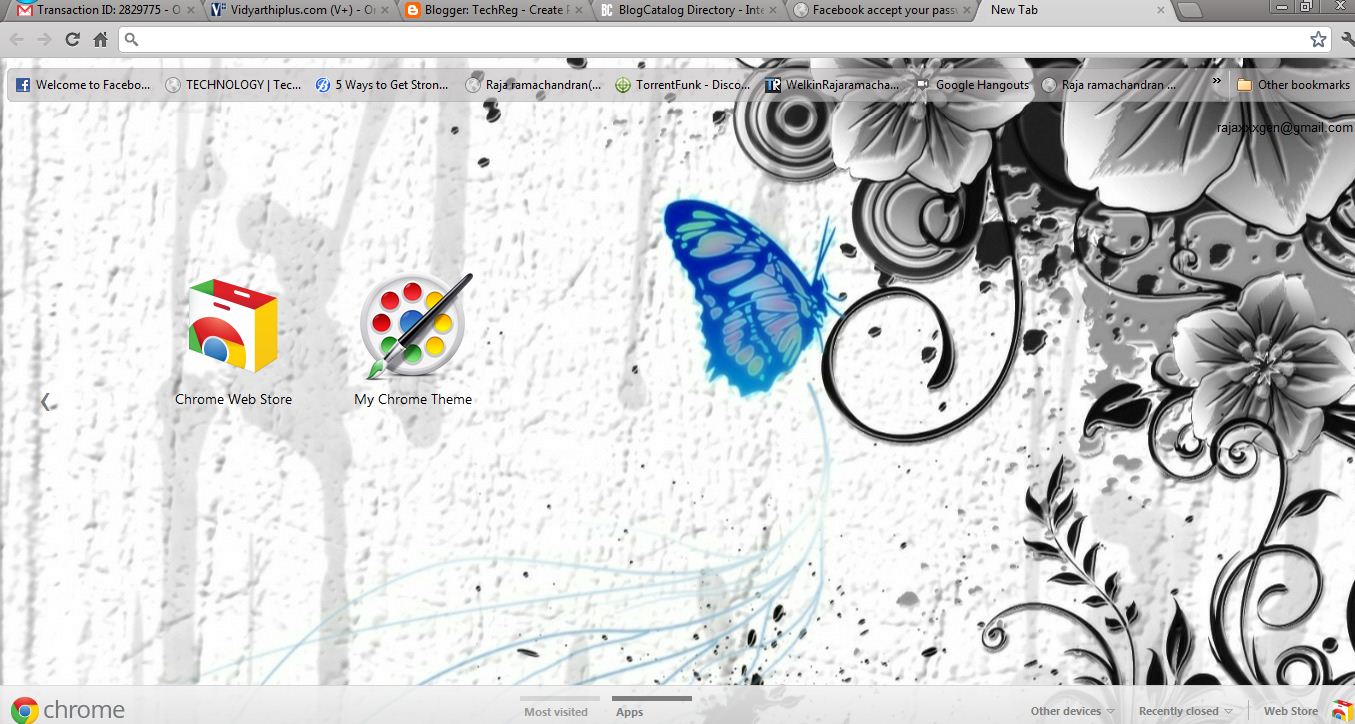
Make your own Google Chrome theme

Sunday
Google Chrome Theme Gallery has thousand of themes but if you want to customize your personal computer browser with your own themes and colors.

Follow the steps to create:
1.Go to this LINK its a chrome extension and add to your chrome browser
After adding the extension go to the app page.


2.Now click on the Start Making Theme and on next window you’ll get two options 
to upload your image from computer
Use webcam to your image

3.After Uploading Photos, on next windows you can adjust the position of your photos, according to your need and then click on preview mode
4.Now in this step, You can edit current tabs, background tabs, windows colors by simply click on their respective paint Brush and then pick any color and click on Continue Step 3.
5.Now name your theme and click Make my theme.

6.Now your Theme is Generated and you can install it on your chrome browser and you can share with your friends.


Download some of my themes
Backtrack5

Download backtrack5 HERE

Abstract 1

Download abstract 1 HERE

Abstract mic

Download abstract mic HERE

Abstract 2
  
Download abstract 2 HERE

Lamborghini 1

Download Lamborghini 1 HERE

Abstract face

Download abstract man HERE
Read more ...

Create ISO image for any file or folder in right from Windows explorer context menu

Sunday
ISO Recorder is a tool that allows to burn CD and DVD images,copy disks, make images of the existing data CDs and DVDs and create ISO images from a content of a disk folder.
  
After installing this tool when you right click on a file or folder Create ISO image file options arrives!!


by clicking it a new dialog box opens

after creating iso image you can use Windows Burn tool or any burning tool to burn image to CD/DVD!!


Download HERE
Read more ...

Remove all applications using Geek Uninstaller

Sunday
GeekUninstaller is portable software It performs deep and fast scanning after the uninstallation and wipe out all the traces left by the uninstalled application. Its Force Removal mode is made to wipe off the most stubborn and broken programs.
  
Features:

  • Clean Removable and Force removable
  • Ultra fast
  • Portable

  
Download HERE

Read more ...

Change Notepad with Ribbon user interface in Windows 7

Sunday

FluentNotepad is a free tool created by ~SalvoG92 at deviantART. 
How To Replace It With The Default Windows Notepad:
  
  1. Download the tool HERE
  2.  Open the archive.
  3.  Navigate to : C:\Windows\ & C:\Windows\System32\ (Change C: to your system drive) and rename theNotepad.exe file in both the folders to Notepad-No-Ribbon.exe
  4. Copy FluentNotepad.exe & Fluent.dll from the archive and paste them in C:\Windows\ &C:\Windows\System32 (Change C: with your system drive).
  5. Rename FluentNotepad.exe to Notepad.exe.
  6. Now the default Windows Notepad will be replaced with the Ribbon UI Notepad.

How To Restore The Default Windows Notepad:
  1. Navigate to : C:\Windows\ & C:\Windows\System32 (Change C: to your system drive) and delete theNotepad.exe & Fluent.dll files in both the folders.
  2. Rename the Notepad-No-Ribbon.exe file in C:\Windows\ & C:\Windows\System32 (Change C: to your system drive) to Notepad.exe.
  3. Now the Ribbon UI Notepad will be replaced with the default Windows Notepad.
Thanks to D2W....


Read more ...

Increase Performance of Windows 7

Saturday

Windows runs well and am impressed by on Windows 7 works out of box, but we can improve performance by changing few things.

We can do the following things
1.Reduce Boot time
2.Improve your Computers performance
3.Increase Speed up EHDD
Now will tell you how to do all the above.


1.Reduce Boot time:


This can be achieved by two as shown below

  • Remove unnecessary startup programs
  • Remove Spyware.


I suggest to use StarUp Delayer.


Startup Delayer gives you the power to optimize your Startup Process by delaying applications from starting up as soon as you log into your computer. By delaying the applications during start up, your computer becomes usable a lot faster. 

Startup Delayer will then start launching your delayed applications when your computer is idler.
Download HERE


2.Improve your Computers performance


Windows 7 has a performance rating tool.
Its rates your system and suggest tips to improve it.
To rate your system
   1.Click the start button and type performance information and tools
  
    2.Click on Rate and run the test.


3.Increase Speed up External Hard Disk Drive(EHDD)

    
The default settings disables write caching for external hard drives. To turn On this feature follow the steps

  1. Goto Device Manager
  2. Now navigate to Disk drivers and press + which is present next to Disk drives
  3. Right click on your external hard disk and select Properties 
  4. Now navigate to Policies tab and click Optimize for performanceand check the both boxes..
Download document version of this article HERE


Read more ...

Momo - Optimize Web Browser

Friday
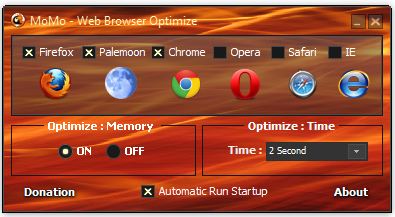
This software works to conserve memory usage when you run the internet browser program such as Firefox, Google Chrome, Internet Explorer, Opera, Safari and Palemon. Maybe for my friends who have over 2GB of RAM will not get a long lingering problems while browsing activity, but would be different if the RAM is in have only 512 MB ​​to 1 GB. A fair amount of time browsing activity will greatly deplete the memory space so the pc would seem to be very slow / slow / heavy as we do other activities besides browsing. Well Momo optimize a web browser is the best solution to solve this problem.
  
Programmer: Muhammad Ridzky
Home Page: Click Here


How to Use:
1. Extract
2. Install Web Irowser Optimize Momo
3. Run then put a mark on the browser you use


4. also marked on the Optimize Memory
5. Then Mark also Automatic Startup Run
(if you are a fun person who likes to surf, then Run sebaikanya Automatic Startup on the mark. That way the program will automatically turn on the pc in the current path, so you do not bother anymore to run this program on and off )

Download HERE
Read more ...

Internet Download Manager 6.11 Build 7 with Patch

Friday
IDM is a tool to increase download speeds by up to 5 times, resume and schedule downloads. Comprehensive error recovery and resume capability will restart broken or interrupted downloads due to lost connections, network problems, computer shutdowns, or unexpected power outages. Simple graphic user interface makes IDM user friendly and easy to use.Internet Download Manager has a smart download logic accelerator that features intelligent dynamic file segmentation and safe multipart downloading technology to accelerate your downloads. Unlike other download managers and accelerators Internet Download Manager segments downloaded files dynamically during download process and reuses available connections without additional connect and login stages to achieve best acceleration performance.


Internet Download Manager supports proxy servers, ftp and http protocols, firewalls, redirects, cookies, authorization, MP3 audio and MPEG video content processing. IDM integrates seamlessly into Microsoft Internet Explorer, Netscape, MSN Explorer, AOL, Opera, Mozilla, Mozilla Firefox, Mozilla Firebird, Avant Browser, MyIE2, and all other popular browsers to automatically handle your downloads. You can also drag and drop files, or use Internet Download Manager from command line. Internet Download Manager can dial your modem at the set time, download the files you want, then hang up or even shut down your computer when it's done .


Download HERE with password techreg
Read more ...

Windows 7 Abstract Theme

Monday
Here is the Abstract theme for free download!!


Download HERE
Read more ...

Indian Cyber Pirate hacked 20 websites

Saturday
Hello Everyone,
   ICP hacked some of the websites as soon below 
404123_331964263527622_100001421523956_881811_512124851_n.jpg (600×200) 
hacked website's List: 
http://emedicbuzz.com/ICP.html
http://www.smkbb.com/ICP.html
http://www.tejasuraya.com/ICP.html
http://www.victorlim.net/ICP.html
http://stereomonoku.com/ICP.html
http://www.directorysavvy.com/ICP.html
http://www.prorev.my/ICP.html
http://pitstop2u.com/ICP.html
http://www.onetechs.com/ICP.html
http://smartnorr.com/ICP.html
http://kepuncakmahligai.com/ICP.html
http://www.intelfxmas.com/ICP.html
http://www.farahaznil.com/ICP.html
http://www.mohdazhar.com/ICP.html
http://andyhowtt.com/ICP.html
http://automagazined.com/ICP.html
http://themedictalk.com/ICP.html
http://siber.my/ICP.html
http://awanitubiru.com/ICP.html
http://azharhamid.net/ICP.html
http://fndrocka.com/ICP.html
http://talkforfinance.com/ICP.html 
Mirror Of defacements : 
http://myproof-h.org/view/?id=142509%2F
http://myproof-h.org/view/?id=142508%2F
http://myproof-h.org/view/?id=142507%2F
http://myproof-h.org/view/?id=142506%2F
http://myproof-h.org/view/?id=142511%2F
http://myproof-h.org/view/?id=142512%2F
http://myproof-h.org/view/?id=142513%2F
http://myproof-h.org/view/?id=142514%2F
http://myproof-h.org/view/?id=142515%2F
http://myproof-h.org/view/?id=142516%2F
http://myproof-h.org/view/?id=142517%2F
http://myproof-h.org/view/?id=142518%2F
http://myproof-h.org/view/?id=142519%2F
http://myproof-h.org/view/?id=142520%2F
http://myproof-h.org/view/?id=142521%2F
http://myproof-h.org/view/?id=142522%2F
http://myproof-h.org/view/?id=142523%2F
http://myproof-h.org/view/?id=142524%2F 
http://myproof-h.org/view/?id=142525%2F
http://myproof-h.org/view/?id=142526%2F
http://myproof-h.org/view/?id=142527%2F
http://myproof-h.org/view/?id=142528%2F
Read more ...

Bypass All Windows OS Login

Friday

Hello Every One
Now we can bypass all windows OS by using this third party application!! 

Follow the steps below :
1.First of all download kon-boot 1.1.download link is provided below
2. Plug-In you USB into your computer and format it to FAT32.


3. Open the download RAR file and extract it and go to the folder named "KonBoot V1.1 32 & 64 bit".
4. Now double click on "KonBootInstall.exe".
5. A command prompt will be prompted and ask you to enter your USB drive latter in my case it is H: enter you USB drive later and press enter. It will be installed automatically on you thumb drive.
6. Now you're done to test it restart your computer and enter your BIOS or Bootload selector. Keep in mind that the device you want to boot from is the USB.
7. Now boot into kon-boot and VOILA you can enter your copy of windows without entering any password.


Download Konboot HERE with password techreg

Source: Parbhakaran
Hooray!!!
Read more ...