Create your own web browser

Sunday
We are using various web browser and How many of you taught of creating a customized or own web browser?

Okay! I have a answer for it.

Things we need are
1. Ur own icon

Lets start.
In 6 steps we can do it. just follow the steps.
Steps:
#1: Goto Make My Browser
[Image: T9Zkufq.png]
#2: Click on Start Now and Enter the name & select your icon.
[Image: 6Z1MKEe.png]
#3: Since MakeMyBrowser uses Chromium source, you can import the bookmarks,saved passwords, user data from your Google Chrome browser so click on Import
[Image: cITLHQu.png]
#4:Now its time to add your desired Bookmarks & set your desired Homepage.
[Image: 8Re0d0f.png]
#5: Add some features to ur browser.
[Image: Oxe0zea.png]
#6: Give your browser a theme and check I agree box & Start downloading your Browser.
[Image: HrW2kuo.png]
Hooray! U created ur Web Browser.

Read more ...

IObit Driver Booster Pro 1.1.0.551

Thursday
IObit Driver Booster is the easiest and most effective driver updating tool, that quickly scans your Windows system for out-of-date drivers, then downloads, installs and replaces them with a click. 
It protects your computer from software conflicts, hardware failures and resolves system crash problems caused by outdated drivers. The program will automatically identify your hardware and then search to ensure that each piece of hardware has the latest device driver installed. 
Any driver issues can be fixed with a few clicks of your mouse. All old drivers can be detected by simply clicking on the "Scan" button, and then you just need to click "Update All" button to refresh these outdated drivers. Compared with other driver updating tools, IObit Driver Booster can improve your PC performance for gaming as well.

IObit Driver Booster excels in its simple and easy to use interface. There's no searching around trying to decide what you need to do: just launch the program, it immediately scans your PC, and a detailed report appears just a few seconds later.

Features:
Automatically Identify Outdated Drivers
One-click Update for Maximum Hardware Performance
Specialized Driver Tweaking for Top Gaming Experience
Fast, Secure and Easy to Use
Boosts your PC performance 

Read more ...

FTP software's for Windows OS

Tuesday

FTP is an acronym for File Transfer Protocol. As the name suggests, FTP is used to transfer files between computers on a network. You can use FTP to exchange files between computer accounts, transfer files between an account and a desktop computer, or access online software archives. Keep in mind, however, that many FTP sites are heavily used and require several attempts before connecting. 

FileZilla Download
FileZilla Client is a fast and reliable cross-platform FTP, FTPS and SFTP client with lots of useful features and an intuitive graphical user interface. FileZilla is an FTP program for file uploading and downloading to and from your FTP site, server, or host. 

The program lets you transfer files and navigate among folders, Web sites, and your computer. This software enables you to perform multiple file transfers simultaneously.


SmartFTP Download

SmartFTP is a commercial desktop FTP client written by SmartSoft LTD for Microsoft Windows. SmartFTP also offers secure, reliable and efficient transfers that make it a powerful tool. SmartFTP is available in three versions, Home, Professional and Ultimate. SmartFTP offers a host of features to help you get the most from your FTP server.
·       SmartFTP can check your file integrity after an upload or a download.
·       Scheduled, unattended file transfers – you don't even have to be around to transfer files. Secure transfers with FTP-SSL.


Core FTP LE Download

Core FTP LE - free Windows software that includes the client FTP features you need. This free, secure FTP client gives you a fast, easy, reliable way to update and maintain your website via FTP.  
Features like SFTP (SSH), SSL, TLS, FTPS, IDN, browser integration, site to site transfers, FTP transfer resume, drag and drop support, file viewing & editing, firewall support, custom commands, FTP URL parsing, command line transfers, filters, and much, much more!


Flash FXP Download

FlashFXP is the easiest to use FTP, FTPS, SFTP, FXP and most user-friendly to master client on the market. Use FlashFXP to publish and maintain your website. Upload and download files, such as documents, photos, videos, music and more! Transfer or backup local and remote files, plus (FXP) server to server ftp transfers. 
FlashFXP offers unique and complimentary advanced features for client configuration.


ZFTP Server Download

Now at version 3.0, zFTPServer Suite is still a free Windows FTP server and has gained a loyal following. It features multi-lingual user interfaces, flexible access control for both accounts and IP addresses, and passive as well as active mode connections. 
 
ZFTPServer supports all popular Windows operating systems (except Vista) and is designed for ease of use by beginning- and intermediate level users.


Serv-U FTP Server Download

Serv-U FTP server for Windows and Linux supports SFTP (SSH), secure FTP (FTPS), secure file sharing, web transfers, and remote administration. Access files from anywhere via mobile devices, web browsers and FTP clients, and avoid data at rest in the DMZ with our MFT gateway.
 
 Let your end users share files or request files with anyone through an intuitive web interface that replaces insecure or unreliable cloud-based applications

Xlight FTP Server Download
Xlight FTP Server is a high performance and easy to use ftp server software for Windows. It is designed to handle thousands of simultaneous ftp clients and use very little CPU and memory. Xlight FTP Server has three editions: personal, standard, professional. 
Personal edition is free for personal use and home users. You can click here to see the difference of three editions.


Golder FTP Server Download


Golden FTP Server is extremely easy to use personal FTP server for Windows and can be run by any person who has the most basic computer skills. 
The program loads automatically on Windows startup and you can identify the files you want to share with two mouse clicks via the dialog window that works in the same way as the standard Windows "Open File:" dialog or via the Windows Explorer context menu.


War FTP Daemon Download

This site is the primary source for information about the War FTP Daemon. War FTP Daemon is the original free FTP server for Windows. When it was released in 1996, it became an instant success. After that, the server has earned its status as one of the "essential" Internet Server Applications for Windows. 
Unlike many other "free" Windows applications, War FTP Daemon contains absolutely no spyware or adware. The program is designed to transfer files to and from the server, according to your demands - and nothing else. There are no backdoor, no advertizing pop-ups, no "reporting home" nonsense or any other hidden "features". The only security or privacy risk with the (at any time) latest version of War FTP Daemon, is misconfigurations or yet undiscovered bugs.
Read more ...

YouTube Downloader 4.7.2 Incl Crack

Friday
YouTube Downloader is software that allows you to download videos from YouTube, Facebook, Google Video, Yahoo Video, and many others and convert them to other video formats.

The program is easy to use, just specify the URL for the video you want to download and click the Ok button!

It also allows you to convert downloaded videos for Ipod, Iphone, PSP, Cell Phone, Windows Media, XVid and MP3.
                      
Sites to download:

  • Youtube
  • BadJoJo
  • BBC.co.uk
  • Bing Video
  • Blip.tv
  • Bofunk
  • Break
  • CollegeHumor
  • Crackle
  • DailyHaHa
  • DailyMotion
  • EbaumsWorld
  • ESPN Videos
  • Facebook
  • FunnyOrDie
  • Gaytube
  • GodTube
  • Google Video
  • Hentaimedia
  • LiveLeak
  • MeFeedia
  • Metacafe
  • Myspace Video
  • Pornhost
  • Pornhub
  • PornoTube
  • RedTube
  • Sevenload
  • Shufuni
  • Slutload
  • Spankwire
  • Stickam
  • Streetfire.net
  • Tangle
  • ThatVideoSite
  • TNAflix
  • Tontuyau
  • Tube8
  • Ustream.tv
  • Vevo
  • VideoClipsDump
  • VideoJug
  • Videu.de
  • Vimeo
  • Worldstarhiphop
Installation Notes:
1. Extract the downloaded file
2. Install YTDSetup.exe
3. Open the Crack folder and copy the ytd.exe
4. Paste it in installed directory folder.
Read more ...

WinRAR 5.0.1 Incl Keygen

Friday
WinRAR is a powerful archive manager. RAR files can usually compress content by 8 percent to 15 percent more than ZIP files can. WinRAR is a powerful compression tool with many integrated additional functions to help you organize your compressed archives. It can backup your data and reduce size of email attachments, decompress RAR, ZIP and other files downloaded from Internet and create new archives in RAR and ZIP file format.
    

WinRAR puts you ahead of the crowd when it comes to compression. By consistently creating smaller archives, WinRAR is often faster than the competition. This will save you disc space, transmission costs AND valuable working time as well. WinRAR is ideal for multimedia files. WinRAR automatically recognizes and selects the best compression method. The special compression algorithm compresses multimedia files, executables and object libraries

Features of WinRAR:
- Using WinRAR puts you ahead of the crowd when it comes to compression by consistently making smaller archives than the competition, saving disk space and transmission costs.
- WinRAR provides complete support for RAR and ZIP archives and is able to unpack CAB, ARJ, LZH, TAR, GZ, ACE, UUE, BZ2, JAR, ISO, 7Z, Z archives.
- WinRAR offers a graphic interactive interface utilizing mouse and menus as well as the command line interface.
- WinRAR is easier to use than many other archivers with the inclusion of a special "Wizard" mode which allows instant access to the basic archiving functions through a simple question and answer procedure. This avoids confusion in the early stages of use.
- WinRAR offers you the benefit of industry strength archive encryption using AES (Advanced Encryption Standard) with a key of 128 bits.
- WinRAR supports files and archives up to 8,589 billion gigabytes in size. The number of archived files is, for all practical purposes, unlimited.
- WinRAR offers the ability to create selfextracting and multivolume archives.
Recovery record and recovery volumes allow to reconstruct even physically damaged archives.
- WinRAR features are constantly being developed to keep WinRAR ahead of the pack.


Read more ...

Internet Download Manager 6.18 Build 11 Final Incl Crack

Friday
Internet Download Manager (IDM) is a tool to increase download speeds by up to 5 times, resume and schedule downloads. Comprehensive error recovery and resume capability will restart broken or interrupted downloads due to lost connections, network problems, computer shutdowns, or unexpected power outages. Simple graphic user interface makes IDM user friendly and easy to use.Internet Download Manager has a smart download logic accelerator that features intelligent dynamic file segmentation and safe multipart downloading technology to accelerate your downloads. Unlike other download managers and accelerators Internet Download Manager segments downloaded files dynamically during download process and reuses available connections without additional connect and login stages to achieve best acceleration performance.
  

Internet Download Manager supports proxy servers, ftp and http protocols, firewalls, redirects, cookies, authorization, MP3 audio and MPEG video content processing. IDM integrates seamlessly into Microsoft Internet Explorer, Netscape, MSN Explorer, AOL, Opera, Mozilla, Mozilla Firefox, Mozilla Firebird, Avant Browser, MyIE2, and all other popular browsers to automatically handle your downloads. You can also drag and drop files, or use Internet Download Manager from command line. Internet Download Manager can dial your modem at the set time, download the files you want, then hang up or even shut down your computer when it's done. 

Other features include multilingual support, zip preview, download categories, scheduler pro, sounds on different events, HTTPS support, queue processor, html help and tutorial, enhanced virus protection on download completion, progressive downloading with quotas (useful for connections that use some kind of fair access policy or FAP like Direcway, Direct PC, Hughes, etc.), built-in download accelerator, and many others.

Installation Method:

1. Install the application and close and When Finish Installation, Close "IDM Tray Icon" From Taskbar.
2. Copy the content in the folder Keygen and Patch and paste it in to the installation folder.

C:Program Files (x86)Internet Download Manager
                        or
C:Program FilesInternet Download Manager

3. Run "Keygen+Patch" and
3.1 Click on Generate
3.2 Click on Patch and select idman.exe
3.3 Click on Auto Register


Read more ...

IBM to invest $1 billion in Watson Super Computer

Thursday
IBM (IBM.N) said it will invest more than $1 billion to establish a new business unit for Watson, as the tech giant hopes to get more revenue from the supercomputer system that beat humans on the television quiz show "Jeopardy".

The world's largest technology service provider said the IBM Watson Group will be headed by Michael Rhodin, who was previously senior vice president of IBM's software solutions group.
IBM said the investment includes a $100 million equity fund to boost innovation at its Watson Developers Cloud, which it opened up to external application developers last year.

The unit will have about 2,000 employees and will be based in New York City.
Watson, which beat expert "Jeopardy" quiz show contestants in 2011, is an artificial intelligence super computer system named after legendary International Business Machines President Thomas Watson.

Using natural language capabilities and analytics, Watson processes information akin to how people think, allowing it to quickly analyze and interpret large amounts of data.
IBM said it has shrunk Watson to the size of three stacked pizza boxes from its original size of a master bedroom.

Under the Watson Group, IBM will offer the technology, which is delivered over the cloud and can power new consumer and enterprise apps, to businesses and industries as well as to consumers.

IBM said it decided to establish the unit because of strong demand for cognitive computing.
"We have reached the inflection point where the interest is overwhelming and we recognized we need to move faster," said Stephen Gold, vice president of Watson Business.
Watson will be deployed on Softlayer, the cloud computing infrastructure business IBM bought last year.

Jamie Popkin, managing vice president at research firm Gartner, said IBM's technology significantly improved how information can be used and managed.
"I think they've developed something that takes us to the next step where information management needs to go," said Popkin.

According to Gartner, by next year there will likely be a large and growing market for Watson-derived smart advisors and it said that Crédit Agricole predicted that these systems will account for more than 12 percent of IBM's total revenue in 2018.
IBM's full year revenue in 2012 was $104.5 billion.

Source: Reuters
Read more ...

Firefox OS Tablet

Thursday
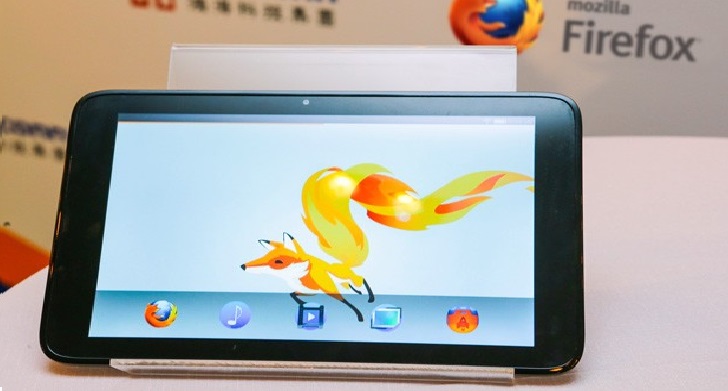
Mozilla Firefox enters into Tablet world. 
Firefox OS Tablet Developer Program
Mozilla has already shown some Firefox OS enhanced smartphones at CES 2014 and has also announced its plans to enter the high-end smartphone market with two models that are yet to come.

mozilla firefox tablet

But that’s not all Mozilla has in stores for 2014. As it turns out, the company is also targeting the tablet sector (who isn't these days), so it has announced a new Fire OS tablet developer program that will provide interested parties with hardware references (via Foxconn) and more.

Mozilla wants to get started on the tablet business, immediately after CES and they hope to finish off the project by the end of the year.

Judging by the image snapped by Engaged, the tablet and the UI will sport a pretty minimalist look and bundle pretty mid-range specifications. Another hint towards this theory is that Mozilla has already parented up with VIA technologies in order to release a line of mini PC with a sub $100 / €73 price tag.
Read more ...

KMSpico v9.3

Wednesday
KMSpico is the ideal tool to activate the final version of Windows 7/8 and Office 2010/2013. Activator does not require user intervention, the entire activation process takes place in the background, just run the activator and a couple of minutes to check the activation status of Windows and/or Office.
   
windows 8 activator

Important:
If you like MS Windows and MS Office please buy legal and original
this program help to test this products, but recommend you buy legal from creators (M$ Corp).
I did this for fun, and now I am done with this.
Working in W8 and Office 2013 fresh install and VOLUMEN LICENSE editions.
Ja mata ne, Farewell, Hejdå, Ciao, Aloha, Zegnaj, Doei

Requirements:
.NET 4.0 or Windows 8/2012.

Activate:
Windows Vista Business/N/Enterprise/N
Windows 7 Professional/N/Enterprise/N
Windows 8 All
Windows 8.1 All
Office 2010/2013
Windows Server 2008/Standard/Datacenter/Enterprise/2008R2/Standard/Datacenter/Enterprise/
Windows Server 2012/Standard/Datacenter/2012R2/Standard/Datacenter

Instructions:
1. Run KMSpico_setup.exe
2. Install it.
2.1 For W8.1 Accept Install the Tap Network driver.
3. Done.

Based off of open source code KMSEmulator of mikmik38 and jm287.

Recommendations Optional:
- Make exceptions to Directory %ProgramFiles%KMSpico*.exe in Antivirus or Defender.

How This Program Works:
1. Install KMSpico in Windows.
1.1 Create Shortcuts for KMSpico
1.2 In W8.1 Install the Tap Network Driver.
2. Run automatically KMSELDI.
2.1 Make Tokens Backup.
2.2 Detect VL or Retail and depending of the License Status activate or convert to VL.
2.3 Activate for 180 days all VL products found.
3. Install a windows service that reactive every windows start.
4. Create a task schedule for AutoPico to run every 24 hours.

Read more ...

Cloud OS

Monday

With a Cloud operating system (also known as a Web OS), you can manage your office work, prepare projects, etc quite similar to how you do on your desktop. The beauty of the idea is that everything is stored on the Internet and hence available everywhere you go!


1) iSpaces

CloudBrowser is a web browser within a browser that allows users to log in to the company’s platform from multiple computers while saving the state of their interface to the company’s data storage centers in the cloud.
ZeroPC provides deep integration with popular Web services to deliver a complete, integrated “social desktop” experience. Using ZeroPC’s account manager tool, you can easily sign-in and access many popular Web services such as Facebook, Twitter and more. A familiar ‘drag & drop’ process makes it super easy to copy and paste content from one service to another.

3) Eye OS

eyeOS Includes 5 powerful applications out of the box thought to be simple and easy to use: Word Processor, Calendar, Mail Client, Spreadsheets and Files Manager.

4) Cloudo

Cloudo is a free computer that lives on the Internet, right in your web browser. This means that you can access your documents, photos, music and all other files no matter where you are, from any computer or mobile phone.
Jolicloud brings all the benefits of cloud computing today, making your netbook the natural extension of all your other computers and mobile devices.
Is a web based OS (aka “Web OS“) that runs in your web browser. All applications and files are stored on the CorneliOS server and are accessible all the time and anywhere. CorneliOS is platform and browser independent and is available as free Open Source software under the GPL as well as under a commercial license.
7) Apple iCloud
 iCloud stores your content so it’s always accessible from your iPad, iPhone, iPod touch, Mac, or PC.* It gives you instant access to your music, apps, latest photos, and more. And it keeps your email, contacts, and calendars up to date across all your devices. No syncing required. No management required.
8) Glide
Glide OS 4.0 is a comprehensive Ad-Free cloud computing solution. Glide provides a free suite of rights-based productivity and collaboration applications with 30GBs of storage. Setup and administer up to six family member accounts including child accounts from your Glide settings panel. The Glide OS provides automatic file and application compatibility across devices and operating systems. With Glide OS you also get the Glide Sync App which helps you to synchronize your home and work files.
9) ZimDesk OS 
 ZimdeskOS is your computer on the web – the entire functionality of a PC – online. A web browser and internet connection are all you need to access your desktop, files and favourite applications. You can access your data anytime from anywhere, from any PC.
 Online OS with several useful features. Share Manager, File Manager, Chat etc…
11) xOS
xOS doesn’t provide a lot of customization options but they do provide a good collection of apps for personal use. It offers Web browser, File manager, Text editor, Notes, Calendar, Paint, Email client, and Canvas Rider (a bicycle game) among others
It’s an another cloud operating system which offers basic apps like Radio, Calendar, File manager, Bookmark manager, Notes, Email client, etc. You can add web apps to it as links which will be opened in new tabs. It also supports Instant messaging between its users.
Read more ...

Track Email Sent is read or not

Sunday
When you  send some important mail for your friends,family or clients.Then you have to wait until the recipient has received your mail and open it or not! It will be not comfortable all the time and even some times the recipient ignores to send reply for your mail,then you might be in a confusion whether the mail is reached or not.So to remove all this hasty things here we got a solution for that..


Bananatag:
Bananatag is another best way to track your sent mail from Gmail Outlook and Yahoo.
  • Just sign up for a free account by Clicking here
  • Now you will get Bananatag extension for your browser
 

   Download For Chrome                Download for Firefox
download+for+chrome
downlaod+extension+for+firefox


  • You can track only 5 emails per day by using free account.If you want to track more then 5 emails using Bananatag then you have to upgrade your account by paying some money.
rightbox+to+tracke+emails

  • You can track your Email by using simple chrome extension Rightinbox
  • After installing extension on your browser.Open your Gmail inbox if you already opened it just refresh it.
  • Now a pop arises the click Continue and then allow Rightbox to access Gmail
click+continue
  • Now Compose your mail add recipient and then click on Track below and send the mail.
click+on+track
  • When the recipient reads your mail you will get notify with details like IP address and location just like below.
RightBox is also helpful for you to Sechdule Emails in future ! Right box send tracking email to your mail not based on any browser extension notifications so you can get tracking mails even though you access your mail from any other computer.
Read more ...

Link Aadhaar card to Bank account and LPG connection

Sunday
Now our people will get introduced to Direct Benefit Transfer scheme for LPG in this month (December).
Now you have to link your Bank accounts, LPG consumer number to Aadhaar card.

Why this scheme introduced?
   This scheme is introduced to answer a question "Why do you need Aadhaar card?"  If you wish to receive the subsidised LPG, you need to become a Cash Transfer Compliant Customer (CTC)  by linking your Aadhaar number to your bank account and LPG Consumer Number.


so how to do this?

Step 1: You need to acquire and fill the bank linking form which is named Form 1. Download HERE.
You need LPG linking form also Download HERE.

or goto Petroleum download section .

Step 2: The consumer under whose name the LPG is registered needs to fill the form. Give the exact 12-digit Aadhaar number in the form. You have to attach a copy of Aadhaar letter/ card when submitting the form to the bank.
The form can be deposited personally at home branch of your bank i.e. where your account is registered. Alternatively, you can also link your Aadhaar Number with your bank account through your distributor. Fill the form “Bank Account – Aadhaar Linkage Form (For LPG Consumer only)” and drop it in “Bank Form Drop Box” kept with your distributor. The forms are also available with your distributor.
If you submit the form personally at bank, an acknowledgment slip will be handed over to you, and you are sure your application is in the safe hands.
Step 3: Get your LPG linked to Aadhaar card
The final step is to link your Aadhaar number with your LPG consumer number. For this, you need to be ready with two things.
1. Name of the distributor
2. Your LPG Consumer Number.
You can find consumer number on your first page of DGCC booklet or on the recent cash memo handed over to you by the delivery boy.
You need to get Form 2 which is available on the same Petroleum and Natural Gas website. Fill it with capital letters using blue or black ink. It needs to be accompanied with two attachments: Copy of the first page of DGCC booklet and recent cash memo.
In case your address mentioned in your Aadhaar letter differs from the address already registered with LPG distributor, you need to attach a photocopy of your address proof.
Address proof can be any of the following:
  • Aadhaar (UID) letter
  • Lease agreement
  • Telephone bill
  • Electricity bill utility bill
  • Self declaration attested by Gazette Officer
  • Flat allotment or Possession letter
  • LIC policy
  • Driving license
  • Voter ID
  • Passport
  • Ration card
  • House registration document.
Please note that before you submit the form, you need to take a combined photocopy of Aadhaar letter and the filled up Form 2.
You are required to place the original Aadhaar letter on the left hand side, while your Form 2 will be on the right side adjacent to it.
The final combined photocopy must have your photo of the Aadhaar letter running on the left side corner with the bar code details.
You have six options for linking your LPG with Aadhaar card.
  1. Personally hand over the application to distributor. You can also drop the application in the prescribed boxes, in the petrol bunks belonging to the same company as your LPG provider - ie, HP, Indane or Bharath - whichever is yours.
  2. Post the application: If you don’t wish to go to the distributor's office or to the nearest petrol pump of the same oil company, you can send it by post to the following address:
IOC (Indane Gas): Indian Oil Corporation Ltd. (Marketing Division), Indance Area Office, 4th floor, Utility  Building, JCW Road, Bangalore 560002, Karnataka.
HPC (HP Gas): Hindustan Petroleum Corporation Ltd, Bangalore LPG Regional Office, No. 3 & 4, Whitefield Road, Mahadevapura PO, Bangalore, Karnataka - 560048
BPC (Bharat Gas): Bharat Petroleum Corporation LTD. DU PARC Trinity, 7th floor, No. 5, M.G.Road, Bengaluru 560 001
  1. Call Centre: Call on 1800-2333-555 and follow the instructions to register your Aadhaar number.
  2. Online:  Browse to www.rasf.uidai.gov.in  and register yourself by clicking on ‘Start Now’ box, located atthe right side of the page.  (However, for reasons unknown, this website was found to be very slow at the time of verifying.)
  3. IVRS:  You can directly call your respective company and follow the instructions of registration.
Indane Gas(IOC): 8970024365
HP Gas (HPC): 9964023456
Bharat Gas (BPC): 9483356789
     6.    SMS: Registration is just a text away. For this, first, you need to register your number with the Oil Company/ Gas agency. Please note that Bharat Gas customers should register the mobile number before hand. Once their number is registered manually with the authorities they can register their Aadhaar number via text.
For HPC/ IOC customers: REG <space> distributor telephone number with STD code without zero <space> consumer number (e.g. REG 1187654321 564321)
Once the mobile number is registered to LPG consumer number, customers of all the three Oil Companies can link the Aadhaar number via text. You need to type: UID <space> Aadhaar Number (eg. UID 32323232323232). The above text should be sent to the respective companies:
IOC (Indane Gas): 8970024365
HPC (HP Gas): 9964023456
BPC (Bharatgas): 57333 or 52725
You will immediately receive a confirmation saying your Aadhaar number is registered. For methods other than SMS, a confirmation will be sent to you in seven days. However you can anytime check your linkage status on the concerned Oil company websites
For Indane, click here: http://indane.co.in/check-aadhaar.php
Finally, check with your bank and ensure your bank account is Aadhaar-enabled.

Read more ...